

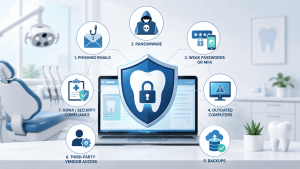
 Technology has become essential to modern dentistry, but that dependence also creates new dental cybersecurity risks that practice owners cannot afford to overlook.
Your schedule, patient records, digital X-rays, insurance information, billing systems, email, imaging platforms, and patient communication tools all depend on technology. When those systems work, they make your practice more efficient. When they are compromised, the impact can extend far beyond a broken computer.
A cybersecurity incident could interrupt appointments, prevent your team from accessing patient information, expose sensitive data, delay billing, and damage the reputation you have spent years building.
Dental practices are also responsible for protecting electronic protected health information. Cybersecurity therefore isn’t simply an IT concern. It is an operational, financial, compliance, and patient-trust issue.
Here are seven dental cybersecurity risks your practice should be paying attention to in 2026.
1. Phishing Emails Targeting Your Team
Cybercriminals don’t always need to hack through a sophisticated security system.
Sometimes they just need one employee to click.
A phishing email may appear to come from Microsoft, a bank, an insurance company, a delivery service, another employee, or even a dental software vendor.
The message might ask someone to:
-
Reset a password
-
Open an invoice
-
Review an attachment
-
Confirm account information
-
Sign into Microsoft 365
-
Approve an unexpected authentication request
-
Download a document
The problem is that dental employees are busy.
The front desk may be answering phones, checking in patients, verifying insurance, collecting payments, and responding to email at the same time. A convincing phishing message can easily slip through when someone is moving quickly.
Employee security awareness training should therefore be an ongoing part of your cybersecurity strategy.
Your team doesn’t need to become cybersecurity experts. They do need to recognize common warning signs and know what to do when something seems suspicious.
2. Ransomware That Brings the Practice to a Stop
Ransomware is one of the most disruptive dental cybersecurity risks because it can affect both data security and daily operations.
Imagine arriving at the office and discovering that:
Your practice management system will not open.
Patient images are unavailable.
Shared files cannot be accessed.
Your schedule is inaccessible.
Employees cannot log into critical systems.
Then a ransom message appears.
Even if no patient information is ultimately released, the downtime alone could be extremely expensive.
Appointments may need to be postponed. Employees may be unable to work normally. Billing and insurance processing could be interrupted. Patients may become frustrated.
Modern ransomware attacks may also involve data theft. Attackers can attempt to steal information before systems are encrypted, giving them another way to pressure the victim.
Reducing ransomware risk requires layers of protection.
That can include endpoint protection, patching, email security, multi-factor authentication, employee training, network security, restricted administrative access, monitoring, secure backups, and a documented recovery plan.
No single cybersecurity product can eliminate ransomware risk.
3. Weak Passwords and Unprotected Accounts
Passwords remain one of the easiest security weaknesses to overlook.
Employees may reuse passwords across applications.
They may choose passwords that are easy to remember—and easy to guess.
Credentials may also become exposed in unrelated data breaches or stolen through phishing attacks.
That is why multi-factor authentication, commonly called MFA, has become increasingly important.
MFA requires an additional method of identity verification beyond a password.
Even if an attacker steals a password, that second verification requirement can help prevent unauthorized access.
Dental practices should prioritize MFA for systems such as:
-
Microsoft 365
-
Email
-
Remote access
-
Cloud applications
-
Administrative accounts
-
Other systems containing sensitive information
Account security should also include removing access when employees leave, limiting administrative privileges, and making sure employees only have access to the systems they need.
Cybersecurity is not only about stopping outsiders. It is also about controlling access inside your environment.
4. Outdated Computers and Dental Systems
Another of the most common dental cybersecurity risks is aging technology.
Dental practices often keep computers, servers, and specialized equipment for many years because replacement can be expensive.
If the equipment still works, replacing it can feel unnecessary.
Unfortunately, “still works” and “still secure” are not the same thing.
Older operating systems and applications eventually stop receiving security updates.
When that happens, newly discovered vulnerabilities may remain permanently unpatched.
This becomes especially complicated with dental technology.
Imaging systems, sensors, scanners, practice management software, and specialized equipment may depend on older computers or software versions. Replacing one piece of technology can sometimes affect several others.
That is why dental IT planning matters.
Your IT provider should understand what is connected to your network, what software those devices depend on, which systems are approaching end of life, and what should be replaced before it becomes a security or productivity problem.
5. Backups That Haven’t Been Tested
One of the most dangerous sentences a business owner can hear after a disaster is:
“We thought the backup was working.”
Having backup software installed doesn’t automatically mean your data can be recovered.
Backup jobs can fail.
Storage can fill up.
Configurations can change.
Certain files may be missing from the backup.
A ransomware attack may reach backups that aren’t sufficiently protected.
That makes backup testing extremely important.
Your practice should know what information is being backed up, how often backups occur, where those backups are stored, and how quickly critical systems could be restored.
That may include:
-
Practice management data
-
Patient records
-
Imaging data
-
Server information
-
Critical business documents
-
Other essential systems
Your backup strategy should also be part of a broader disaster recovery plan.
If your server failed tomorrow morning, who would your staff call?
How long would recovery take?
How much data could you lose?
Could your practice continue seeing patients?
Those are questions that should be answered before an emergency occurs.
6. Third-Party Vendor Access
Modern dental practices work with a long list of technology vendors.
Your practice may use separate companies for:
-
Practice management software
-
Digital imaging
-
CBCT systems
-
Patient communication platforms
-
VoIP phones
-
Internet service
-
Payment processing
-
Cloud applications
-
Hardware support
Sometimes those vendors need remote access to your systems.
That access can create additional dental cybersecurity risks if it is not managed properly.
Who has access to your server?
Are old remote access tools still installed?
Do former vendors still have active accounts?
Are third parties using secure authentication?
Does anyone know when vendors connect?
A proactive dental IT provider should help coordinate vendor access and make sure outside companies are not receiving more access than necessary.
Your office manager should not have to become the security gatekeeper for every technology company your practice works with.
7. Treating HIPAA Security as a One-Time Project
Cybersecurity is never completely finished.
Your practice changes constantly.
You hire employees.
People leave.
Software changes.
New computers are installed.
New imaging equipment gets added.
Cloud services are adopted.
New cybersecurity threats appear.
That means security practices have to evolve too.
The HIPAA Security Rule requires covered organizations to maintain safeguards for electronic protected health information. Practices looking for additional guidance can review the HIPAA Security Rule resources from the U.S. Department of Health and Human Services.
A security assessment completed years ago does not necessarily reflect your technology environment today.
Strong cybersecurity requires an ongoing process of reviewing risks, correcting weaknesses, managing accounts, training employees, updating systems, verifying backups, and monitoring technology.
You Don’t Need to Become a Cybersecurity Expert
The biggest challenge with dental cybersecurity risks is that many vulnerabilities are difficult for a practice owner to see.
You can tell when a computer will not turn on.
You can tell when your Wi-Fi is slow.
You may not know whether a workstation missed a critical security update.
You may not know whether an old employee still has access to an account.
You may not know that a backup stopped running three weeks ago.
You may not know whether an outside vendor has unnecessary remote access.
That is where proactive IT management becomes important.
Your IT provider should help identify these issues before they become emergencies.
Protect Your Patients and Your Practice
Cybersecurity doesn’t need to become another full-time responsibility for the dentist or office manager.
The right technology partner can help reduce dental cybersecurity risks by proactively managing security, backups, devices, accounts, updates, vendors, and the systems your employees rely on every day.
ILER Networking & Computing provides a range of managed IT, cybersecurity, backup, cloud, and technology services designed to help businesses protect their technology and keep operations running smoothly.
For dental practices, the first step can be even simpler.
If you’re unsure where your biggest vulnerabilities may be, start with a Free Dental IT Review.
We’ll help you take a closer look at your current technology environment, identify potential areas of concern, and understand where improvements may be needed.
Request your Free Dental IT Review and get a clearer picture of how well your practice is protected.





